Shipping Methods & Carriers
When a customer checks out on your store, the Shopify shipping option they select determines which Ingram Content Group® shipping method is sent with the fulfillment request — which in turn determines the carrier (USPS, UPS, or DHL) that delivers the package.
This page explains how the mapping works, where to configure it in the app, and which carrier handles each Ingram shipping method. Use it when planning storefront shipping rates, troubleshooting carrier choice on a specific order, or evaluating margin against Ingram's rate sheet.
How carrier selection works
The carrier is determined by the method, not chosen per order
Ingram does not pick a carrier on a per-order basis. Each Ingram shipping method is always handled by one specific carrier family — UPS, USPS, or DHL (international). Once you know which Shopify shipping option a customer selected at checkout and how that option is mapped, you know in advance which carrier will ship the package. This is useful for planning storefront shipping rates against Ingram's rate sheet and protecting your margin.
The flow on every fulfilled order:
- Customer selects a Shopify shipping option at checkout (e.g. Standard, Expedited, Priority).
- Emersoft Books looks up the corresponding Ingram shipping method based on your mapping (configured in Apps > Emersoft Books > Settings > CDF Lite).
- The fulfillment request is sent to Ingram with that method.
- Ingram routes the package through the carrier associated with the method (USPS, UPS, or DHL).
Default Shopify → Ingram method mapping
The app maps by shipping option name. Name your Shopify shipping options exactly as they appear in the Shopify Shipping Method column below — when a customer selects one at checkout, the app matches that name and sends the corresponding Ingram shipping method with the fulfillment request.
| Shopify Shipping Method | Default Ingram Code | Service |
|---|---|---|
| Standard | 21 |
USA Economy / Media Mail / Book Rate |
| Expedited | 26 |
Expedited Mail |
| Priority | 24 |
Priority Mail |
| Express | 24 |
Priority Mail |
| International | 50 |
International Courier |
| Default (fallback) | 21 |
USA Economy |
The default codes work for most US-based stores. The Default Shipping Method code (21) is used as a fallback whenever a customer's chosen shipping method does not match any of the names above.
You can override the Ingram code for any row in Apps > Emersoft Books > Settings > CDF Lite > Shipping. If your Ingram account uses different service codes, update the values there to match — contact your Ingram account manager if you are unsure which codes apply to your account.
Adding a shipping option that maps to Ingram
- In Shopify Admin, go to Settings > Shipping and delivery and open the shipping rates for the Emersoft Books Fulfillment - Ingram location.
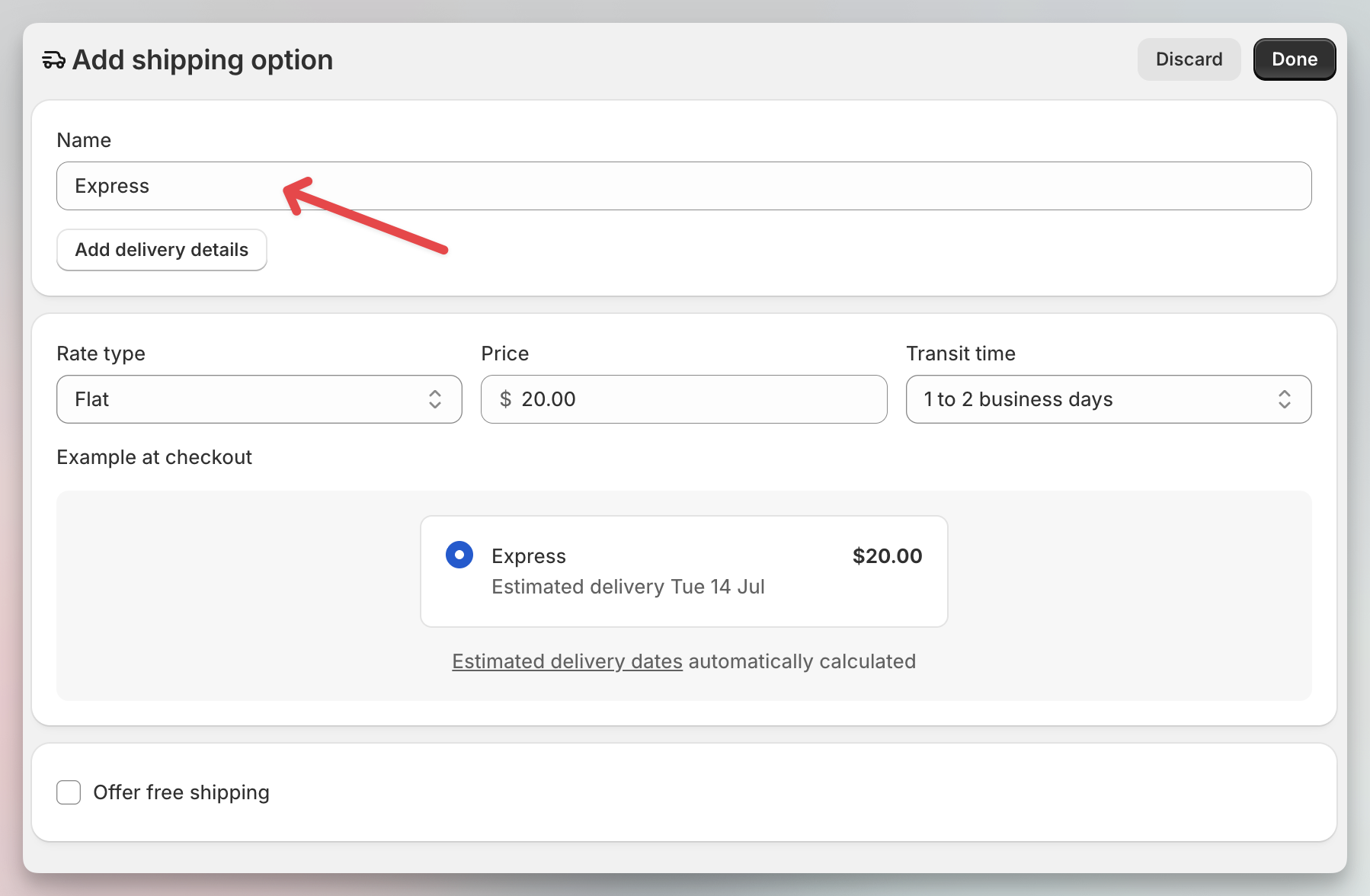
- In the shipping zone, click Add shipping option.
- Name it exactly as it stands in the table — for example
Express, not "Express Shipping". The name is what the app matches; the price and transit time are yours to set. - Click Done and save.
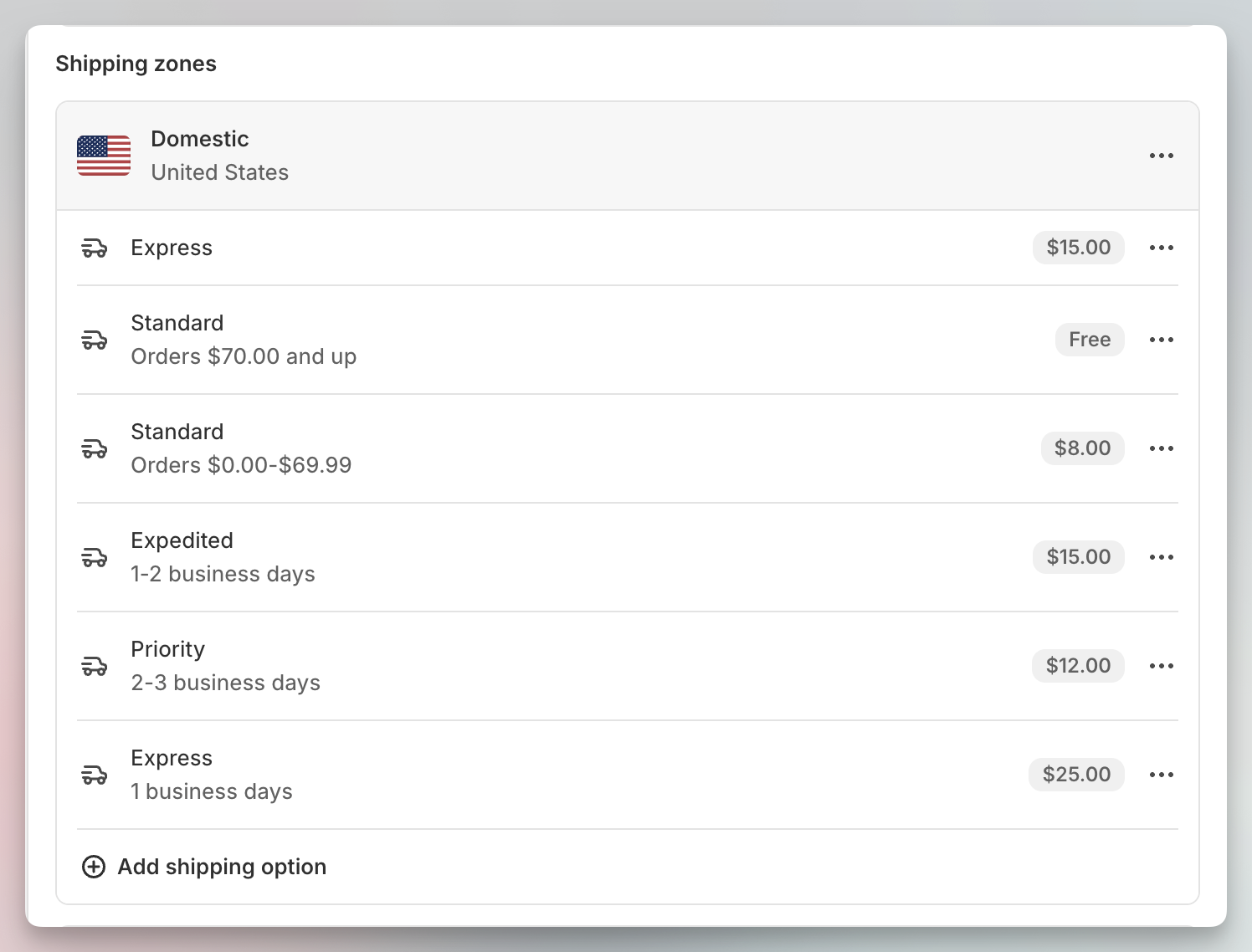
A configured zone looks like this — every option named to match the mapping table. You can have more than one option with the same name (for example, two Standard rates with different price conditions, one of them free over a threshold) — they all map to the same Ingram method:
A common domestic rate setup configured for clients looks like this:
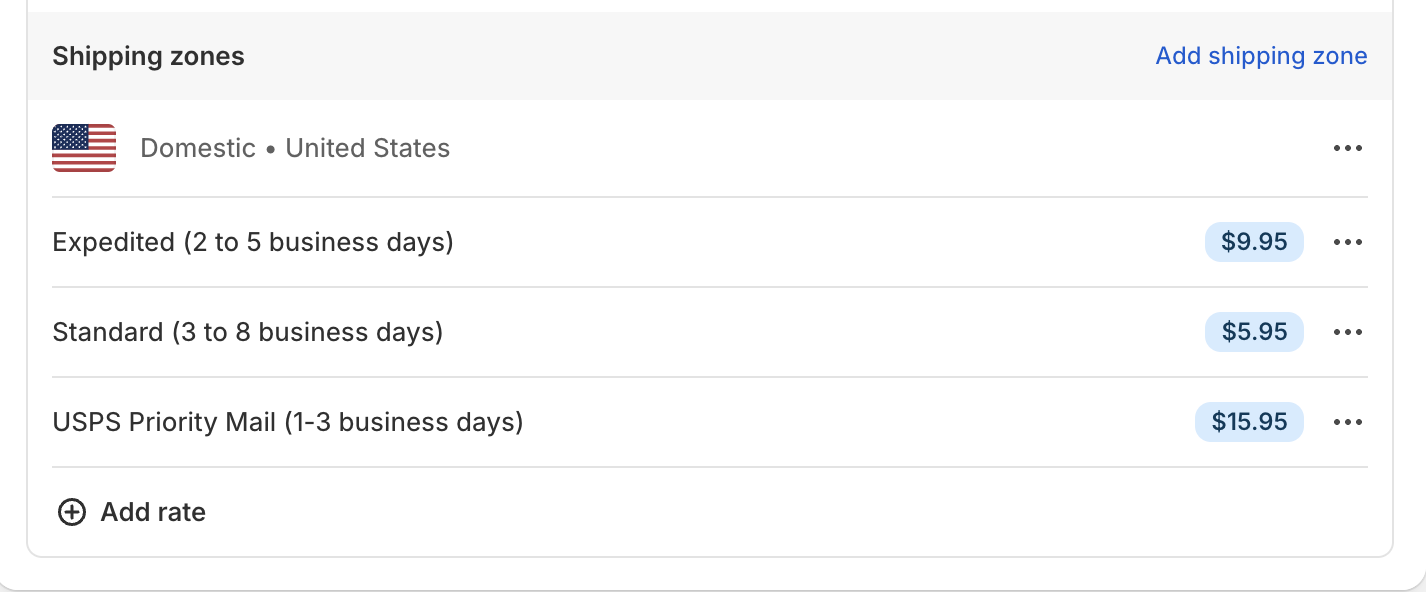
Prices and delivery estimates shown are examples and can be adjusted for each store.
When setting customer-facing prices, see Ingram's rate sheets, including the current international mail rates.
Full list of Ingram shipping methods
The tables below are the full reference — every shipping method available through Ingram CDF Lite, the carrier that handles it, and whether PO Box addresses are accepted. Use this as a planning tool when setting storefront rates or deciding how to map a Shopify shipping option.
Domestic (US)
| Ingram Method | Carrier | PO Box delivery |
|---|---|---|
| USA Economy (Media Mail / Book Rate) | USPS | ✓ |
| Expedited Mail (USPS Ground Advantage) | USPS | ✓ |
| Priority Mail | USPS | ✓ |
| Ground | UPS | — |
| 2nd Day Air | UPS | — |
| 3 Day Select | UPS | — |
| Next Day Air Saver | UPS | — |
| Next Day Air | UPS | — |
International
| Ingram Method | Carrier | Tracking | PO Box delivery |
|---|---|---|---|
| INTL Standard | DHL | Not tracked | ✓ |
| INTL Priority | DHL | Partially tracked | ✓ |
| INTL Courier | DHL | Fully tracked | — |
USA Economy is the lowest-cost option for most book shipments
USA Economy ships via USPS Media Mail (book rate), the cheapest service for physical books and the default for most US stores. Ingram consolidates parcels through its OSMW network at the start of the route before they enter the USPS system.
PO Boxes and international
UPS does not deliver to PO Boxes — any order that needs a PO Box address must use a USPS method (USA Economy, Expedited Mail, or Priority Mail). Internationally, INTL Standard and INTL Priority accept PO Boxes; INTL Courier does not.
Setting your storefront shipping rates
Storefront shipping rates — what your customers pay you at checkout — are set in Shopify Admin > Settings > Shipping and delivery for the Emersoft Books Fulfillment - Ingram location. They are independent from Ingram's rates (what Ingram charges you).
Two common approaches:
- Set your own rates — flat rate, free shipping over a threshold, weight-based, or any structure you choose. Each Shopify shipping option you create at the storefront becomes a candidate for mapping to an Ingram method on this page.
- Replicate Ingram's rates — Ingram charges you by item weight per shipping method. Mirror Ingram's pricing using Shopify's weight-based conditional rates so the rate the customer pays you covers what Ingram charges you for the equivalent method/carrier. Use the carrier mapping above to decide how to structure your storefront options.
See First Steps — Adding shipping rates for the step-by-step on configuring rates in Shopify.
Ingram's rate sheets
Ingram publishes CDF rate sheets showing what it charges per shipment:
- CDF Economy Mail rates (PDF)
- CDF Expedited Mail rates (PDF)
- CDF Media Mail rates (PDF)
- CDF Priority Mail rates (PDF)
- CDF International Mail rates (spreadsheet)
Domestic mail rates are zone-based. Zones are calculated from the origin of the Ingram distribution center that fulfills the order, and can be looked up at USPS.com.
Peak season surcharges
From October 4, 2026 through January 17, 2027, Ingram adds carrier peak season surcharges on top of the rate sheets above — the rate sheet PDFs do not include them. Surcharges are charged per package and apply to every CDF Lite shipment sent with an affected method.
USPS Priority Mail (default code 24) — October 4, 2026 – January 17, 2027
| Weight | Zones 1–4 | Zones 5–9 |
|---|---|---|
| 0–3 lb | $0.40 | $0.85 |
| 4–10 lb | $0.65 | $1.75 |
| 11–25 lb | $1.05 | $3.85 |
| 26+ lb | $3.15 | $9.10 |
USPS Expedited Mail (default code 26) — October 4, 2026 – January 17, 2027
| Weight | All zones |
|---|---|
| 0–3 lb | $0.25 |
| 4–10 lb | $0.35 |
| 11+ lb | $0.65 |
UPS Demand Surcharge — UPS Air covers 2nd Day Air, 3 Day Select, Next Day Air Saver, and Next Day Air (Ingram code 11)
| Service | Oct 25 – Nov 21, 2026 | Nov 22 – Dec 26, 2026 | Dec 27, 2026 – Jan 17, 2027 |
|---|---|---|---|
| UPS Ground | $0.50 | $0.75 | $0.50 |
| UPS Air | $1.35 | $2.50 | $1.35 |
Looking up the carrier for a specific order
After Ingram dispatches an order, the carrier and tracking number are written back to the Shopify order. Open the order in Shopify Admin > Orders and look at the fulfillment record — the carrier name and tracking link appear there.
Before dispatch, you can predict the carrier from the Shopify shipping option the customer selected and the mapping configured here.