Gardners Catalogue & Importing
For stores in the UK and EU
Gardners is the distributor for stores in the UK (with a Gardners UK account) and the EU (with a Gardners EU account). Stores in the US use Ingram. Which distributor does my store use?
Use Emersoft Books to find Gardners titles and import them as Shopify products. Before publishing a product, check its edition, availability, and GBP price.
Search the Gardners catalogue
In Shopify Admin, open Apps > Emersoft Books.
You can search by ISBN, title, author, publisher, series, or keywords. Use ISBN when you need a specific edition.
You can also filter by subject, binding, language, price, discount, audience age, or upcoming publication date. The Top Bestsellers filter is not available for Gardners.
Gardners doesn't give a language for many titles, and most of them are English. The English or unspecified language filter shows English titles together with titles that have no language. The other language filters show only titles tagged with that language.
Filter by discount
Where a title's discount is known, search results show it under the price. To see only titles with at least a given discount, open More filters and enter a minimum percentage under Discount.
The discount comes from Gardners' stock information. Where Gardners gives no discount for a title, the discount from Settings → Gardners → Discount is used, both in the results and in the filter. This is the same discount used to calculate the product cost on import. If Emersoft Books has connected your own Gardners data feed, the discount comes from that feed.
Titles you can't sell in your region
Some publishers don't allow a book to be sold in certain countries. When the Gardners catalogue says that a title can't be sold in your region, you can't find it in search or import it as a new product, and Global Search doesn't offer it as a book to order:
- Gardners UK stores: titles that can't be sold in the UK.
- Gardners EU stores: titles that can't be sold in one or more EU countries, because your customers can be anywhere in the EU.
Products already in your store are not removed, and you can still update them. Titles with no information about where they can be sold stay available.
Understand availability
| Status | What it means |
|---|---|
| In Stock | Gardners currently reports available stock |
| Low Stock | Only a small quantity is currently reported |
| Out of Stock | No immediately available stock is reported |
| Preorder | The book has not yet been published or released |
| Unknown | Emersoft Books cannot confirm an available quantity |
A Print on Demand title may show as Out of Stock in the main availability status. Open its details to check whether the title status is Print on Demand.
A published title that Gardners is reprinting or reissuing is not a preorder. It shows as Out of Stock, or as In Stock or Low Stock when Gardners still has copies. Its details show the title status, such as Reprinting or Awaiting Reissue.
Availability is not a reservation. Gardners confirms whether a book can be supplied only after receiving the order. See the Gardners FAQ for its current stock guidance.
How often availability updates
Gardners availability updates once a day from Gardners' daily stock file. This covers the statuses shown in search and, once Inventory Sync is active, stock at the Emersoft Books Fulfillment - Gardners location. A change on Gardners' side usually appears in your store within a day.
If Emersoft Books has connected your own Gardners data feed, stock and availability come from that feed instead, and the stock of your imported Gardners products is updated from it in Shopify. Search shows only titles listed in your feed.
When a title you imported is no longer listed in the stock file (or in your own data feed, if connected), its stock at the Emersoft Books Fulfillment - Gardners location is set to 0 at the next stock update, so you don't keep selling stock Gardners no longer reports. If a later file lists the title again, its stock is updated from that file.
If a stock file looks incomplete, Emersoft Books doesn't use it. Your stock stays as it was until the file has been checked or Gardners sends a complete one.
Extended Catalogue titles
Gardners Extended Catalogue (GXC) titles are included in search results. They may appear as Unknown because they are not represented as ordinary on-hand stock.
Unknown does not mean that a title is unavailable. Gardners may still accept it after an order is submitted. GXC titles are supplied under the same Gardners terms as Stock titles, but Gardners usually takes much longer to fulfil orders for them than for titles it holds in stock.
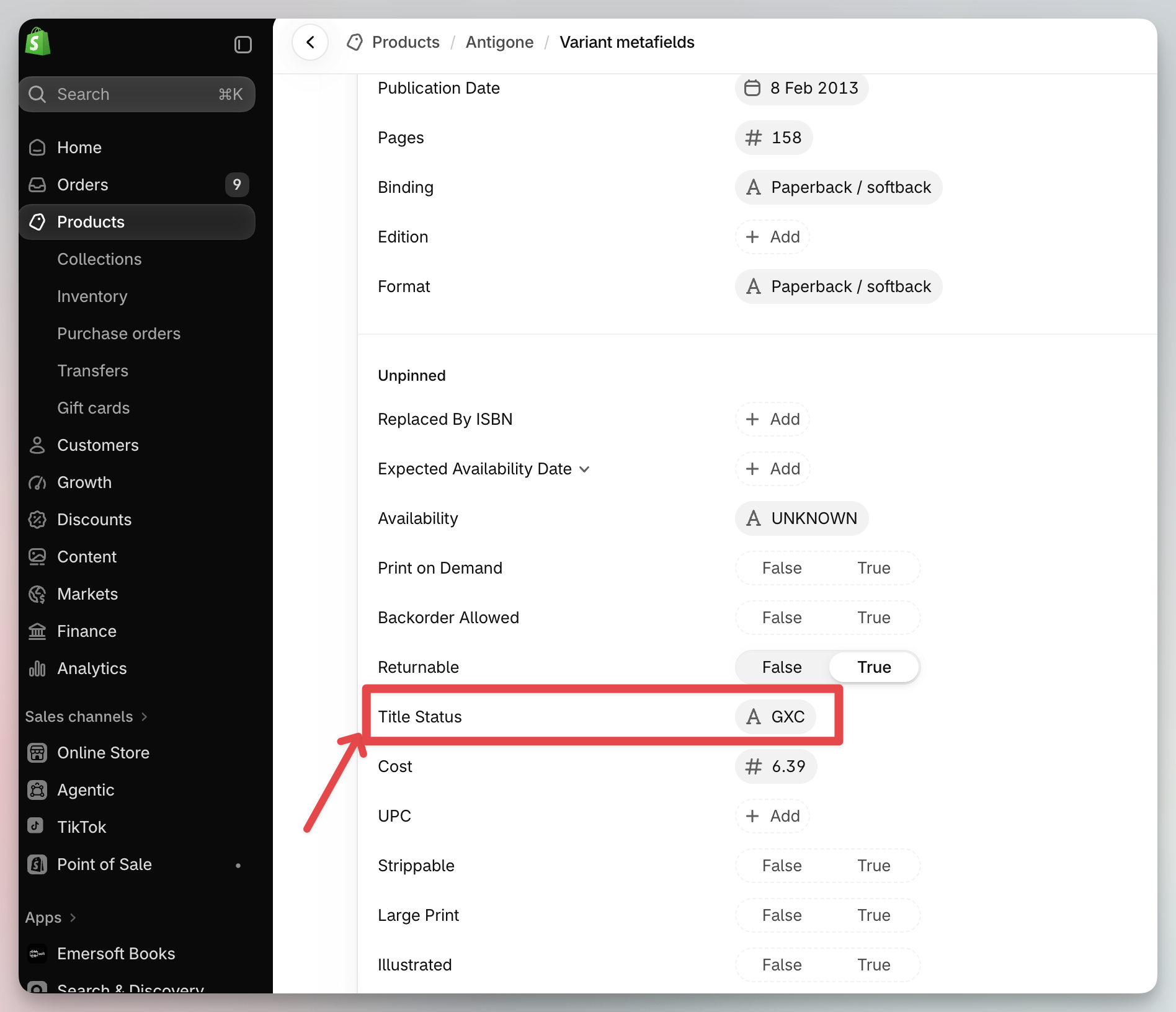
After you import a GXC title, its product variant shows Title Status GXC and Availability UNKNOWN in variant metafields. Title Status is recorded when the title is imported or updated.
What Global Search offers
On your storefront, Global Search offers books you don't sell yet when Gardners reports them as In Stock or Low Stock. It can also offer pre-orders if you turn on Enable pre-orders, which is off by default for Gardners. See Pre-orders for when they appear. Out of Stock, Unknown, and GXC titles aren't offered. You can still import pre-orders and these titles from the app as described on this page.
Special Order and Firm Sale
You may see Special Order Service (SOS) or Firm Sale in Gardners information or Shopify order updates.
SOS titles are Firm Sale. They normally cannot be cancelled or returned once ordered, and their final cost may not be known until Gardners obtains them from the supplier. See Gardners' Terms and Conditions and the Gardners cancellation guidance.
Subject filters
Gardners describes books using Thema subjects. Emersoft Books translates the BISAC subject filters shown in the app into the corresponding Thema categories automatically.
No additional setup is required. Imported Gardners products use Gardners Thema subjects as Shopify tags rather than Ingram BISAC metadata.
See Gardners Product Tags & Metafields for the complete list of tags and structured book data added to Shopify.
Import a book
- Find the required title or ISBN.
- Confirm the binding, publication date, and availability.
- Select the title using its checkbox, or open its details and click Add to import. Repeat for any additional titles.
- In the selection panel, click Import 1 Book or Import N Books.
- Review the import options and click Confirm & Import.
- Open the imported product in Shopify and review it before publishing.
Each Gardners ISBN is imported as a separate Shopify product. Different formats or editions are not grouped into variants of one product.
Review before publishing
Check that:
- The ISBN and binding are correct.
- The product price is suitable for your store.
- The availability is appropriate.
- The description and cover are present.
- The product is available through the intended Shopify sales channels.
Books created on your storefront by Global Search are published straight away, without this review. Check your Import settings before turning it on.
Prices are in GBP
Gardners catalogue prices are provided in GBP and are not automatically converted. The displayed RRP or cost is catalogue information and may differ from your final Gardners account price.
Next step
Importing a book does not by itself enable automated fulfillment.
Next, review Gardners Product Tags & Metafields, then see Gardners Setup & Fulfillment to connect your account, prepare Shopify shipping, and test an order.